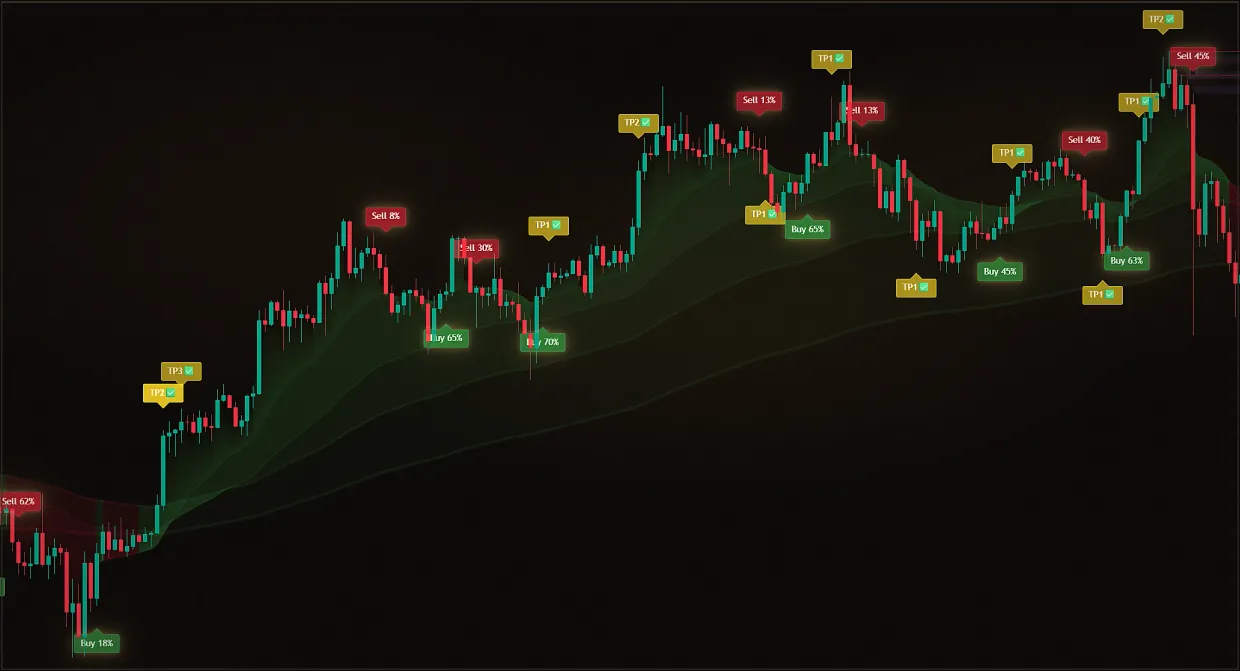
Markets and assets are thousands, and there is no time to flip through the charts - strong movements go away without you.
Manual chart search
By the time we got to the right tool, the movement had already happened.
Midas Screeners
Hundreds of assets are monitored automatically. A ready analysis and chart arrive in Telegram, leaving you to decide which situations deserve attention.
The screener removes a trader's main routine: searching charts manually. It continuously monitors more than 1,000 assets across six market classes, selects situations with meaningful movement and sends a chart screenshot with a short analysis. Signals are grouped by type: buys and sells, rebounds from levels, level breakouts, sharp moves and high-volatility assets.
The screener is not automated trading and does not issue entry commands. A signal means that a potentially interesting situation has appeared and should be reviewed on the chart with Midas indicators. Screeners are included with every paid Midas plan, including monthly plans, but not with the two-indicator demo.
Updated: · Midas Team
What problem the screeners solve
Don't know what to trade right now? Most traders spend hours manually browsing charts, miss out on strong moves, and end up going where it's late or where there's just noise.
Midas Screener takes over this work: it continuously monitors 1,000+ assets across six market classes, finds interesting trading situations and sends them with analytics and a screenshot of the chart.
Instead of chaotic market searches, you get a ready-made stream of filtered signals for different scenarios:
- Buy and sell signals (Buy and Sell).
- Bounce off levels.
- Level breakouts.
- Sharp pulses (Pump and Dump).
- Volatile assets.
- Other market situations with meaningful activity and movement.
Midas screeners in numbers
- 1,000+ assets under monitoring – no longer need to manually view hundreds of charts.
- Six classes of markets are under control – crypto assets, stocks, Forex, indices, commodities and futures.
- Five types of signals for each market – choose tabs for your style and strategy.
- A continuous stream of trading ideas: The screener keeps an eye on the market while you’re busy with other tasks.
How the screener workspace is organised
Signals are organised by market, with separate spaces and tabs for each one, so you can focus on the markets and scenarios you actually trade.
Each tab has a fixed post: it describes in detail what the alerts come by, and a list of tickers on which alerts go is published - it can be copied to yourself.
The base signals of the indicator on the tab ticker list are the same Buy or Sell, which you see on the chart, only comes by itself.
A separate tab under the scenario, "price hit a strong zone and pushed back," comes when the reaction has already occurred, and you just have to open the chart and decide whether you are working this bounce or not.
The reverse scenario is that the level didn't hold the price and it went behind it. Two strategies are specifically placed in different tabs, so you only subscribe to the one you actually trade.
Fast up and down: same principle as Pump&Dump on the chart, just across the entire asset list at once. For those who are catching momentum rather than waiting for a calm trend.
A selection of instruments showing meaningful movement, volume and range right now. It answers what may be worth opening today when your usual assets are moving sideways.
The background of the movement: important market events in one place, not the signal to enter, but the context of why the candle flew away and whether to follow it.
How to access the screeners
Screeners save a lot of time, but they are most useful inside the Midas ecosystem:
- Screeners show what may deserve attention right now.
- Midas indicators help you review the chart in depth and confirm the setup.
- VIP club helps to grow faster through training, debriefing and finished materials.
Screener questions and recommendations
Midas doesn’t just cover one task, it covers the trader’s entire cycle: find an asset, understand the situation, make a decision and grow faster. You always have a stream of ideas to analyze and trade, not an empty chart and the question of “what to open today”.
What is a screener in simple words?
A screener saves time by monitoring the market for you, so you do not have to search charts continuously and can focus on moments when meaningful movement appears.
What does the screener signal mean?
A signal is a reason to open the chart and perform your analysis.
It is not a profit guarantee, financial recommendation or mandatory trade.
Can I enter a trade at any signal?
No. Screener doesn't give off-the-shelf deals: it's not copy-trading, it's not auto-trading, it's not "come in right now."
A group signal means only that a potentially interesting situation has appeared. Open the chart and analyse it with Midas indicators before deciding whether to trade.
Which signals are better to choose?
Choose one or two clear strategies and trade a limited set of setups without jumping randomly between trading styles. Keep a trade log - the VIP club hosts one of the trader's best diaries - and note which signals work best.
Analyse and filter every setup, and protect your trading capital.
How to use signals correctly?
1. When a signal arrives, open the chart. Clicking the ticker copies it for a quick search, and the Open Chart button leads directly to TradingView. Review the chart before considering an entry.
2.Look at the trend and levels through the top indicator Midas Up: where the market is headed, whether there is a strong trend or sideways, from what level the signal came, whether there are strong zones, volumes, liquidity, channel, EMA.
3. Confirm entry through the lower indicator Midas Down: enter the trade only when it confirms the idea. More confirmations - stronger setup.
4. Adjust the trade to your trading strategy: shift the entry point, reduce or expand the stop, adjust the goals or completely miss the signal if the setup in your opinion is weak.
What can I do to avoid losing money?
1.Do not trade blindly on alerts: a signal without chart analysis has no value.
2 Don’t go into every notification in a row: even a good screener shouldn’t turn into a machine gun on deposit.
3. Trade only according to a defined strategy and the Midas analysis system.
4.Respect risk management: for each transaction there should be a clear stop, acceptable risk and a profit-taking plan.
5. Test before risking capital: if you have not checked the strategy and settings on historical data, you are guessing rather than trading systematically.
Did this guide help?
Thank you. Your answer was recorded.
Thank you for your feedback. You can continue in the English-language Midas bot. Open the English bot
The demo includes only Midas Up and Midas Down. The full Midas toolset requires a paid plan.
Test Midas on your own TradingView chart
- Seven days free: Midas Up and Midas Down on your TradingView chart
- No card or prepayment: access is linked to one public TradingView username
- Markets available on TradingView and timeframes from one minute to one month; choose settings for the asset and trading style
No card. No payment. A TradingView username is public; never send a password.
8,400+ Midas indicator installations · 300+ client reviews · active since 2024